This is the definitive landing page for our AudioUnit (AUv3) releases – exclusively – for Apple platforms. Our new releases are available as super universal apps for iOS, iPadOS, macOS and (recently) visionOS!
You are welcome.
JAX Essentials Series (ES) Squasher released
JAX ONE XModulator Extended released
JAX Essentials Series (ES) TubeFlavour released
JAX Selective Range [SR] : Flanger released
JAX ONE Delay Extended released
JAX Selective Range [SR] : Phaser released
JAX ONE Reverb Extended released
JAX Selective Range [SR] : Chorus released
JAX ONE : Frequency Shifter Extended released
JAX Dynamics : Flow released
JAX Triple Series [TS] : 3Verb released & updated
JAX Triple Series [TS] : 3Stereo released & updated
JAX MIDI Control Pad released & updated!
JAX Selective Range [SR] : Reductor released & updated
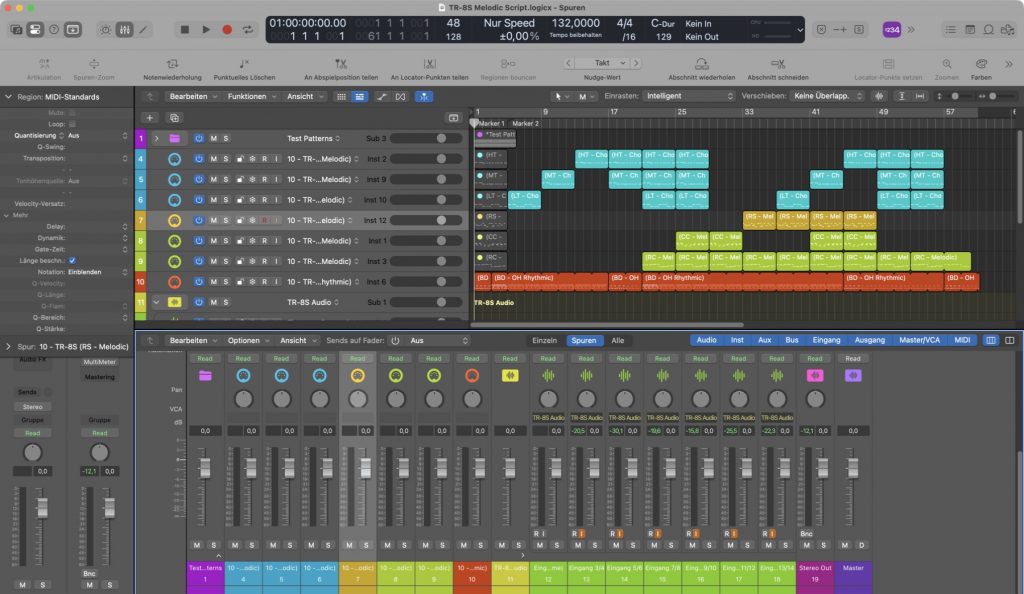
ROLAND TR-8S – A Melodic Script v1.0 sequenced chromatically in realtime. Only TR-8S is use in this demo. 6 instances of the script are used in the MIDI arrangement.
( We did not check, but the script basically also should work with ROLANDs TR-6S, as the controllers seem to be the same, but reduced count of drum channels (only 6 instead of 11) are available there. )
Melodic capabilities of the Roland TR-8S/6S are unfortunately quite limited. But there are essentially and traditionally two different ways to overcome this limitation.
The first way is often used and just takes multiple drum channels (of the max. 11) for triggering melodic samples with fixed different coarse tuning. This can be used for arpeggios and chords, of course. The disadvantage there is always a drastic reduction of the available channels for just the melodic parts (i.e. with hardcoded arpeggios and melodies across different channels).
A second way is to use automated tuning and coarse tuning on a single channel, which limits the usage for monophonic melodic lines in the manner of arpeggios and sequenced melodies. But editing this is a nightmare. Both methods are cumbersome and difficult to edit and overview.
So we took a closer look at the second method for a useful application. We have therefore written a special MIDI script (for Apples Logic Pro – Scripter – on all platforms), that allows melodic playing with the external sequencer or even with direct MIDI keyboard input in realtime. The script will just be inserted with a MIDI plugin (Scripter – included with Logic Pro) for each desired drum instrument or channel on the TR-8S. Sequencing the TR-8S from a host is also generally a good alternative, because the TR-8S is limited in pattern space and also does not have a song mode.
So we preferably are using the TR-8S like an external tone generator in our studio setup and are sequencing everything directly to the TR-8S’s tone generation.
Per default the device receives MIDI notes and controller messages on MIDI channel 10 (but different keys), so any sequencing of the 11 drum channels can be used to form a complete arrangement or song of any length or complexity. Audio return is by the way on individual stereo channels with the proprietary ROLAND USB driver.
The TR-8S is conceptional a multi-timbre device but monophonic per channel. Chords are still possible with the ‘stacking trick’, using multiple drum channels. The script uses specifically the ‘coarse tuning’ parameter, assigned to the CTRL button on the device for ‘melodic’ drum instruments. If someone presses a key on the keyboard or triggered by the external sequencer, this is automatically translated to a sequence of special controller messages, followed by note on/off message on the correct drum note. Result is a melodic playing like on any usual synthesizer. Possibly even on all 11 channels at ones. This will work for Samples and the FM voices of the TR-8S, althougt the assignment is slightly different then.
The script can be assigned to theoretically mapping all 11 drum instrument channels this way on the TR-8S. So finally, chromatically tuned playing is possible now and chords can be achieved also, if a melodic voice is used on different drum channels simultaneously, with different note tuning.
We have demonstrated the usage and a small demo arrangement here, which exemplary shows the results. We just tested the script this way, it is in no way a demonstration of the sound possibilities on the TR-8S ^^.
The script is used on 6 selected individual instruments (LT, MT, HT for chords, RS, CC and RC for melodies) with samples assigned. The rest of the drum channels is used for triggering drum sounds for the rhythmic parts as usually supposed with the TR-8S. The script is also quite handy for recording melodic lines into the TR-8S pattern memory with ease.
Note: The Apple Logic Pro Sripter is a MIDI plugin audio unit and extremely powerful. It uses usual JAVAScript for modifying MIDI messages in realtime. It should be easily translatable to hosts, which support any kind of scripting for MIDI streams.
Note: The script is embedded into a Logic Pro demo song project, seen in the video. You can save it as a preset for the Logic Scripter and use it with your own compositions as you want.
If you want to play the demo song from the video, you also can download the specific TR-8S preset (kit) here:
Note: The kit is not necessary. You always can set up your TR-8S as you want when using our script preset. The most important part is to know, that the CTRL knob on the device for that specific part (channel) has to be mapped for ‘Coarse Tuning’. This can be a sample or even the FM voices on the TR-8S.
Have fun!
Addendum: We do not know what scripting capabilities other host applications provide for realtime MIDI plugins. But our script is quite basic JavaScript. So it easily could be ported to other sequencers with appropriate scripting support. However, the code for the script is here:
/*
	With Scripter, you can use JavaScript to create your own custom MIDI processing
	effects, including slider controls for real-time interaction.

	For detailed information about using Scripter, including code samples,
	see the MIDI plug-ins chapter of the Logic Pro X Effects or
	MainStage 3 Effects manual.
*/


/////////////////////////////////////////////////////////////////////
/* THIS SCRIPT IS FOR THE ROLAND TR-8S TO ENABLE CHROMATIC PLAYING */
/////////////////////////////////////////////////////////////////////

// written and provided by midi.digitster.com 2026

/*
	USAGE & NOTES:

	- make sure you trigger all external notes on MIDI channel 10 (default drum channel)
	- select the correct instrument with the popup menu for chromatic playing
	- initialize all tune values for the selected instrument on the TR-8S to defaults
	- assign 'coarse tune' to CTRL knob on the TR-8S for the selected instrument
	- use an extra track for each instrument playing chromatically between C1 and C5
	- use rhythmic patterns on an extra track, do not interfer with melodic instruments
	- polyphony is conceptually not supported on the TR-8S (only mono melodies)

	- see example arrangement for usage
*/

// Please note, that not all voices from the TR-8S can be tuned this way.
// Some voices do not support coarse tuning.


// user interface

var PluginParameters = [{name:"Instrument Channel", type:"menu",
                        valueStrings:["BD", "SD", "LT", "MT", "HT", "RS", "HC", "CH", "OH", "CC", "RC"],
                        defaultValue:11, numberOfSteps:11}];

// initializations

const step = 127 / 48;
const values = new Array(49);
for (i = 0; i < 49; i++)
{
	values[i] = Math.round(step * i);
}
//Trace(values);


// MIDI handling ///////////////////////////////////////////////////////////////

function HandleMIDI(event)
{
	//event.trace();
	//event.send();
	//return;

	if (event instanceof NoteOn)
        {
    	        var cc = new ControlChange; // make a new control change message
		cc.channel = 10; // trigger channel
    	        cc.number = getController(); // set it to controller number
    	        cc.value = getValue(event.pitch); // set the controller value
    	        cc.send(); // send the controller
    	        //cc.trace();

    	        var tone = new NoteOn(event);
    	        tone.channel = 10; // default trigger channel
		tone.pitch = getKey(); // set base pitch
		tone.send();
		// tone.trace();
	}
	else if (event instanceof NoteOff)
	{
	        var tone = new NoteOff(event);
    	        tone.channel = 10;
		tone.pitch = getKey();
		tone.send();
		//tone.trace();
	}
}

// sub functions ///////////////////////////////////////////////////////////////

// get the coarse tuning value
function getValue(pitch)
{
	var index = pitch - 36;

	if (index >= 0 && index < 49)
	return values[index];

	return values[24]; // fall thru
}

// get the coarse tuning controller for selected instrument
function getController()
{
	var result = GetParameter("Instrument Channel");

	if ( result == 0 ) // BD
	return 96;
	else if ( result == 1 ) // SD
	return 97;
	else if ( result == 2 ) // LT
	return 102;
	else if ( result == 3 ) // MT
	return 103;
	else if ( result == 4 ) // HT
	return 104;
	else if ( result == 5 ) // RS
	return 105;
	else if ( result == 6 ) // HC
	return 106;
	else if ( result == 7 ) // CH
	return 107;
	else if ( result == 8 ) // OH
	return 108;
	else if ( result == 9 ) // CC
	return 109;
	else if ( result == 10 ) // RC
	return 110;

	return 0; // fall thru, something went wrong

}

// get the trigger key for selected instrument
function getKey()
{
	var result = GetParameter("Instrument Channel");

	if ( result == 0 )  // BD
	return 36; // or 35
	else if ( result == 1 ) // SD
	return 38;  // or 40
	else if ( result == 2 ) // LT
	return 43;  // or 41
	else if ( result == 3 ) // MT
	return 47;  // or 45
	else if ( result == 4 ) // HT
	return 50;  // or 48
	else if ( result == 5 ) // RS
	return 37;  // or 56
	else if ( result == 6 ) // HC
	return 39;  // or 54
	else if ( result == 7 ) // CH
	return 42;  // or 44
	else if ( result == 8 ) // OH
	return 46;  // or 55
	else if ( result == 9 ) // CC
	return 49;  // or 61
	else if ( result == 10 ) // RC
	return 51;  // or 63

	return 0; // fall thru, something went wrong
}

// EOF
The Jupiter X / Xm is a nice hardware synthesizer, which is 5 channel multi-timbre and has included sets of thousands of factory voices. These patches must be selected with some cryptic MSB/LSB bank select commands.
We created a clickable patch map for Steinberg Cubase, that at least enables to select presets from the various banks in the Jupiter X / Xm for all channels. (Channel 5 is reserved by Roland for the drum sets, which are mapped too.)
All documented internal banks are mapped with correct MSB/LSB patch change commands but the names are generic (yet?) and not the real names from the Jupiter’s memory. Putting in thousands of patch names into a Cubase patch map editor is a nightmare. (Apple’s Logic Pro allows for instance easy import of lists for such and this is time consuming too but doable with some effort.) If someone finds the time to edit 5000++ patch names for Cubase manually, line by line, taken from the Roland docs, this would be awesome, but our basic goal (multi channel patch selection) is done with the current patch map.
We also mapped the scene patches, which should be sent on a MIDI channel other than 1 to 5 (reserved for the parts), i.e. MIDI channel 16. Different to the documentation, the scene patches are not organized in special small virtual banks but according to Rolands MIDI implementation chart in 4 extra banks a 128 patches with their own MSB/LSB bank select commands. Not supported are the waveform IDs from the doc, as these are not even useful nor selectable via MIDI commands.
The Jupiter X / Xm is a multi emulation device, which even features for instance nearly thousand of JX-5080 voices alone, alongside with loads of banks of their classic virtual analog emulations and also a large ‘common’ tone bank with all the production basics. All these patches are organized in several banks inside the memory (ROM) of the synthesizer. Also user bank tones can be selected this way. Total access to the available voices from the Cubase production environment becomes quite easy now.
There is a basic video, how it works on our youtube channel:
All the sound comes from the Roland Jupiter Xm external hardware synthesizer, controlled by MIDI.
The Cubase (version 13) patch map can be downloaded below. You can import the device map into Cubase after unzipping the file to your hard disk. The file is in XML format and is editable and widely extendable with Cubase afterwards.
There is a useful formula for calculating the strange Cubase 14 byte numbers for the bank select command: Just do : (128 * MSB number) + LSB number : from Roland’s documentation above. ^^ Alternatively the bank select commands in correct order could be done separately too. (This is merely of a meaning if you want to extend the patch map yourself.)
Initially we wanted to remove our JAX Stereo Tool in favor of the new JAX 3Stereo, where it is integrated. Some users did want to keep the classic tool (one of our first releases). So we updated the old code for latest frameworks and devices and re-adjusted the price.
Users of our JAX 3Stereo do not need the legacy JAX Stereo Tool. Because 3Stereo implements the same tool in its all-pass mode.
Recently a very popular app tracker site announced their shutdown. Most likely for financial reasons and missing support from Apple.
We find this is a logical consequence to the current, still raising situation.
Especially niche businesses are suffering from the current trend of overdriven price drop mania. It is a bad trend and some developers do then react with virtualised “normal” prices – this is raising the prices in general – as they otherwise could not keep their cost compensation for the app development. Because now they are forced to continuously drop prices and making one sales action after another, which short or long term, will result in a financial disaster.
I am wondering, why Apple even allows apps in their own AppStore, which obviously perform a kind of “smart developer punishment” by flagging raised prices in red (bad prices) normal prices in orange and dropped in green (good prices). So only dropped prices are green (and thus good). This is very consumer centric and also manipulating on the one side and potentially business damaging on the other side, the developers side – and also negative for Apple.
Nobody is raising prices for fun.
A price increase judgement or punishment of any sort is basically against Apples rules and the existing sales conditions and contracts. Developers are totally free to adjust their prices to the requirements and nobody, especially a 3rd party should not be allowed to perform any judgement or even punishment on that matter.
Also no developer is forced to do a price drop ever.
Developers have a strong contract with Apple. A third party cannot expect that Apple cooperates with them, if they perform continuously business-damaging promotional actions based on Apples own AppStore data, which is usually grabbed by just hijacking (stealing) their officially available and published data.
So for instance some of such 3rd party providers have insufficient and obviously incomplete data sets, actually hindering especially small developers to even appear there with their full set of releases (as happened with us : 9 of our releases were just not even in the 3rd party app’s database and thus, out of any access by the users of this app).
And some people, who see themself as kind of “influencers” or self proclaimed promoters obviously are thinking, they easily could (mis)use such platforms for playing God and for instance hindering selected developers to appear by promoting just everything but those.
There are several dangers with such app trackers, dangers of potential manipulation; and we would rather like to support Apple, as we have clear contracts with them. We also never have seen something similar discriminating from Apple. And if Apple chooses not supporting such providers and even removing their misused services from access this way or even removing such questionable app-tracker apps from their AppStore, we are absolutely with them.