
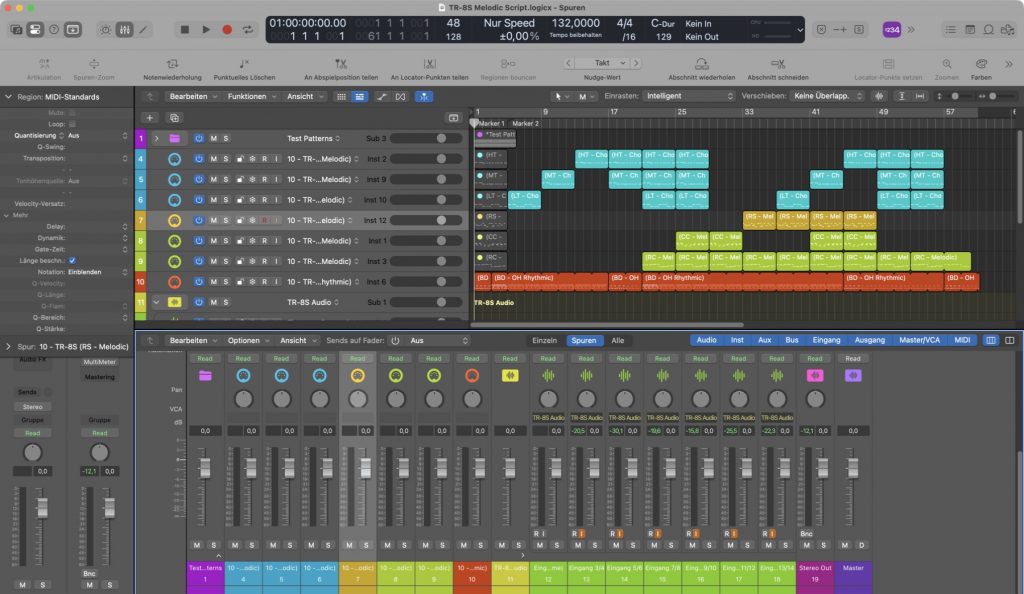
ROLAND TR-8S – A Melodic Script v1.0 sequenced chromatically in realtime. Only TR-8S is use in this demo. 6 instances of the script are used in the MIDI arrangement.
( We did not check, but the script basically also should work with ROLANDs TR-6S, as the controllers seem to be the same, but reduced count of drum channels (only 6 instead of 11) are available there. )
Melodic capabilities of the Roland TR-8S/6S are unfortunately quite limited. But there are essentially and traditionally two different ways to overcome this limitation.
The first way is often used and just takes multiple drum channels (of the max. 11) for triggering melodic samples with fixed different coarse tuning. This can be used for arpeggios and chords, of course. The disadvantage there is always a drastic reduction of the available channels for just the melodic parts (i.e. with hardcoded arpeggios and melodies across different channels).
A second way is to use automated tuning and coarse tuning on a single channel, which limits the usage for monophonic melodic lines in the manner of arpeggios and sequenced melodies. But editing this is a nightmare. Both methods are cumbersome and difficult to edit and overview.
So we took a closer look at the second method for a useful application. We have therefore written a special MIDI script (for Apples Logic Pro – Scripter – on all platforms), that allows melodic playing with the external sequencer or even with direct MIDI keyboard input in realtime. The script will just be inserted with a MIDI plugin (Scripter – included with Logic Pro) for each desired drum instrument or channel on the TR-8S. Sequencing the TR-8S from a host is also generally a good alternative, because the TR-8S is limited in pattern space and also does not have a song mode.
So we preferably are using the TR-8S like an external tone generator in our studio setup and are sequencing everything directly to the TR-8S’s tone generation.
Per default the device receives MIDI notes and controller messages on MIDI channel 10 (but different keys), so any sequencing of the 11 drum channels can be used to form a complete arrangement or song of any length or complexity. Audio return is by the way on individual stereo channels with the proprietary ROLAND USB driver.
The TR-8S is conceptional a multi-timbre device but monophonic per channel. Chords are still possible with the ‘stacking trick’, using multiple drum channels. The script uses specifically the ‘coarse tuning’ parameter, assigned to the CTRL button on the device for ‘melodic’ drum instruments. If someone presses a key on the keyboard or triggered by the external sequencer, this is automatically translated to a sequence of special controller messages, followed by note on/off message on the correct drum note. Result is a melodic playing like on any usual synthesizer. Possibly even on all 11 channels at ones. This will work for Samples and the FM voices of the TR-8S, althougt the assignment is slightly different then.
The script can be assigned to theoretically mapping all 11 drum instrument channels this way on the TR-8S. So finally, chromatically tuned playing is possible now and chords can be achieved also, if a melodic voice is used on different drum channels simultaneously, with different note tuning.
We have demonstrated the usage and a small demo arrangement here, which exemplary shows the results. We just tested the script this way, it is in no way a demonstration of the sound possibilities on the TR-8S ^^.
The script is used on 6 selected individual instruments (LT, MT, HT for chords, RS, CC and RC for melodies) with samples assigned. The rest of the drum channels is used for triggering drum sounds for the rhythmic parts as usually supposed with the TR-8S. The script is also quite handy for recording melodic lines into the TR-8S pattern memory with ease.
Note: The Apple Logic Pro Sripter is a MIDI plugin audio unit and extremely powerful. It uses usual JAVAScript for modifying MIDI messages in realtime. It should be easily translatable to hosts, which support any kind of scripting for MIDI streams.
You can download the script here as a *.zip file:
TR-8S-Melodic-Script.logicx.zip
Note: The script is embedded into a Logic Pro demo song project, seen in the video. You can save it as a preset for the Logic Scripter and use it with your own compositions as you want.
If you want to play the demo song from the video, you also can download the specific TR-8S preset (kit) here:
Note: The kit is not necessary. You always can set up your TR-8S as you want when using our script preset. The most important part is to know, that the CTRL knob on the device for that specific part (channel) has to be mapped for ‘Coarse Tuning’. This can be a sample or even the FM voices on the TR-8S.
Have fun!
Addendum: We do not know what scripting capabilities other host applications provide for realtime MIDI plugins. But our script is quite basic JavaScript. So it easily could be ported to other sequencers with appropriate scripting support. However, the code for the script is here:
/*
	With Scripter, you can use JavaScript to create your own custom MIDI processing
	effects, including slider controls for real-time interaction.

	For detailed information about using Scripter, including code samples,
	see the MIDI plug-ins chapter of the Logic Pro X Effects or
	MainStage 3 Effects manual.
*/


/////////////////////////////////////////////////////////////////////
/* THIS SCRIPT IS FOR THE ROLAND TR-8S TO ENABLE CHROMATIC PLAYING */
/////////////////////////////////////////////////////////////////////

// written and provided by midi.digitster.com 2026

/*
	USAGE & NOTES:

	- make sure you trigger all external notes on MIDI channel 10 (default drum channel)
	- select the correct instrument with the popup menu for chromatic playing
	- initialize all tune values for the selected instrument on the TR-8S to defaults
	- assign 'coarse tune' to CTRL knob on the TR-8S for the selected instrument
	- use an extra track for each instrument playing chromatically between C1 and C5
	- use rhythmic patterns on an extra track, do not interfer with melodic instruments
	- polyphony is conceptually not supported on the TR-8S (only mono melodies)

	- see example arrangement for usage
*/

// Please note, that not all voices from the TR-8S can be tuned this way.
// Some voices do not support coarse tuning.


// user interface

var PluginParameters = [{name:"Instrument Channel", type:"menu",
                        valueStrings:["BD", "SD", "LT", "MT", "HT", "RS", "HC", "CH", "OH", "CC", "RC"],
                        defaultValue:11, numberOfSteps:11}];

// initializations

const step = 127 / 48;
const values = new Array(49);
for (i = 0; i < 49; i++)
{
	values[i] = Math.round(step * i);
}
//Trace(values);


// MIDI handling ///////////////////////////////////////////////////////////////

function HandleMIDI(event)
{
	//event.trace();
	//event.send();
	//return;

	if (event instanceof NoteOn)
        {
    	        var cc = new ControlChange; // make a new control change message
		cc.channel = 10; // trigger channel
    	        cc.number = getController(); // set it to controller number
    	        cc.value = getValue(event.pitch); // set the controller value
    	        cc.send(); // send the controller
    	        //cc.trace();

    	        var tone = new NoteOn(event);
    	        tone.channel = 10; // default trigger channel
		tone.pitch = getKey(); // set base pitch
		tone.send();
		// tone.trace();
	}
	else if (event instanceof NoteOff)
	{
	        var tone = new NoteOff(event);
    	        tone.channel = 10;
		tone.pitch = getKey();
		tone.send();
		//tone.trace();
	}
}

// sub functions ///////////////////////////////////////////////////////////////

// get the coarse tuning value
function getValue(pitch)
{
	var index = pitch - 36;

	if (index >= 0 && index < 49)
	return values[index];

	return values[24]; // fall thru
}

// get the coarse tuning controller for selected instrument
function getController()
{
	var result = GetParameter("Instrument Channel");

	if ( result == 0 ) // BD
	return 96;
	else if ( result == 1 ) // SD
	return 97;
	else if ( result == 2 ) // LT
	return 102;
	else if ( result == 3 ) // MT
	return 103;
	else if ( result == 4 ) // HT
	return 104;
	else if ( result == 5 ) // RS
	return 105;
	else if ( result == 6 ) // HC
	return 106;
	else if ( result == 7 ) // CH
	return 107;
	else if ( result == 8 ) // OH
	return 108;
	else if ( result == 9 ) // CC
	return 109;
	else if ( result == 10 ) // RC
	return 110;

	return 0; // fall thru, something went wrong

}

// get the trigger key for selected instrument
function getKey()
{
	var result = GetParameter("Instrument Channel");

	if ( result == 0 )  // BD
	return 36; // or 35
	else if ( result == 1 ) // SD
	return 38;  // or 40
	else if ( result == 2 ) // LT
	return 43;  // or 41
	else if ( result == 3 ) // MT
	return 47;  // or 45
	else if ( result == 4 ) // HT
	return 50;  // or 48
	else if ( result == 5 ) // RS
	return 37;  // or 56
	else if ( result == 6 ) // HC
	return 39;  // or 54
	else if ( result == 7 ) // CH
	return 42;  // or 44
	else if ( result == 8 ) // OH
	return 46;  // or 55
	else if ( result == 9 ) // CC
	return 49;  // or 61
	else if ( result == 10 ) // RC
	return 51;  // or 63

	return 0; // fall thru, something went wrong
}

// EOF
Possibly one of the owners of a ROLAND TR-6S could check, whether the script works there too?
The MIDI controller values seem to be the same, but the count of drum channels is reduced to merely 6 indstead of 11 on the TR-8S.
It theoretically also should work with the TR-1000 flagship.
The main architectural difference across the latest TR- models from Roland is the count of supported internal drum channels (14 on the TR-1000) and the different synthesis engines per channel, which are widely expanded with each higher model.
But the “pitched voices problem” still exists on all of them. This is a conceptual limitation, as there are 14 unused MIDI channels on all those devices remaining, which theoretically could be used for melodic playing of all available drum voices. ^^
Used are just channel 1 (for pattern select and channel 10 for kit select, the triggers and controllers). So TRs are not so flexible as for instance an old MPC, where pitched voices (keygroups) are fully integrated. This makes quite a difference for usage.
The TRs are still just plain drum machines without even touching the potential of a real “groovebox”. This is unfortunately Rolands traditional sleepiness or rather product dividing, as they can sell numerous expensive other devices this way…
But there are other limits across the series, which really disappoint me. This is for instance that the user samples are not able to edit a sustain loop.
This is quite fatal, as it is not really a sampler support on the TR-xS devices then. It is just primitive crap. They would not recognize a looped sample on loading, nor provide a method to set loop points after loading manually. However, their preset samples often do have such loops set. So it is just another such limitation by concept.
The only reason why I took a TR-8S is to have all the classic Roland drum machines in the ACB version as a hardware unit and being able to edit and play this via MIDI. The sample feature is quite rudimentary but nice to have for taking some special drum shots out of the box.
I got it on the second hand market for just around 400 bucks. More I would not have spent. Also have the System 8 and the Jupiter Xm.
The TR-1000 however, is just far out of my focus therefore as the price in relation to the capabilities is exorbital. It is not even on my desired focus. A realistic price would be around 1.500 dollars for the TR-1000. But missing essential features mentioned make it quite unrealistic to get anywhen.
The big problem novadays is that traditional manufacturers quickly jumped the train of surface scratching influencers rather than listening to the musicians, the actual users who try to make music with their stuff. This is fatal and will hopefully lead to ‚hot or flop‘ quite quickly too.